


- Selenium
- JMeter
- DevOps
- VERSION CTRL
- ONLINE QUIZ
- Number System MCQ - 1
- Number System MCQ - 2
- Number System MCQ - 3
- Simplification MCQ - 1
- Average MCQ - 1
- Simple Interest MCQ - 1
- Compound Interest - MCQ
- Percentage - MCQ
- Ratio and Proportion - MCQ
- Profit and Loss - MCQ
- Time, Speed, and Distance - MCQ
- Time, and Work - MCQ
- Boats and Streams - MCQ
- General Knowledge Quiz - Indian Polity
- General Knowledge Quiz - History
- General Knowledge Quiz - Geography
- GK Quiz - Indian Polity - 2
- GK Quiz - Banking and Finance
- GK Quiz - Economics
- GK Quiz- Merger and Acquisition
- GK Quiz- International Bodies
- English Grammar quiz-1
- English Grammar quiz-2
- S/W PROJECT MANAGEMENT
- PROTRACTOR
- Java -Tutorials
- MORE
Cucumber Tags MCQ Questions and Answers
Practice Cucumber Tags MCQ questions and answers designed for automation testers, QA engineers, Selenium professionals, and software testing enthusiasts preparing for technical interviews. This free online Cucumber Tags quiz helps evaluate your understanding of how tags are implemented and used within real-world Cucumber automation frameworks.
The quiz covers important concepts such as feature-level tags, scenario-level tags, tag expressions, selective test execution, smoke testing, regression testing, and test suite organization. These topics are frequently used in automation projects and are commonly asked during software testing interviews.
Attempt the multiple-choice questions below to assess your knowledge of Cucumber Tags, identify weak areas, and strengthen your understanding of one of the most important features used in Selenium-Cucumber automation frameworks.
What are Tags in Cucumber?
Tags in Cucumber are special annotations used to organize, categorize, and selectively execute test scenarios and feature files. They help automation testers manage large test suites efficiently by grouping related test cases under meaningful labels such as Smoke, Regression, Sanity, Login, Checkout, or API.
Tags can be applied at both the Feature level and Scenario level. During test execution, testers can run only specific tagged scenarios instead of executing the entire test suite. This significantly reduces execution time and improves the efficiency of automation frameworks.
Cucumber Tags are widely used in Selenium-Cucumber frameworks for smoke testing, regression testing, release validation, and environment-specific execution. Because of their practical importance in real-world projects, questions on Cucumber Tags are frequently asked in automation testing interviews and certification assessments.
Instructions
Topic- tags
The test consists of 9 questions.
No negative marking for this test.
No Time limit
The pass percentage is 70%
The correct answer with a description will be displayed after the answer has been marked.
Submit the test to calculate your score once you are done with all the questions.
Complexity Level- Moderate
@CucumberOptions(tags = "~@smoke")
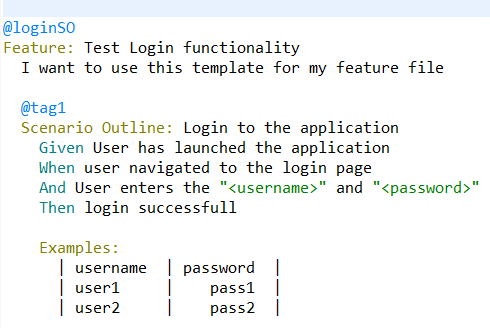
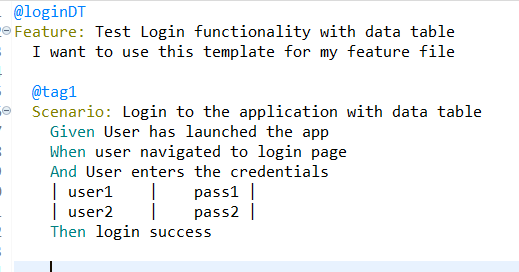
@CucumberOptions(tags = "~@loginDT")
Determine which scenario will be executed (considering the given CucumberOptions):
@CucumberOptions(tags = {"@loginSO, @loginDT"})
Determine which scenario will be executed (considering the given CucumberOptions):

Common Uses of Cucumber Tags in Automation Testing
Cucumber Tags play an important role in organizing and maintaining automated test suites. By assigning tags to scenarios and feature files, teams can easily control which tests should run during different stages of the software development lifecycle.
- @Smoke – Used to execute critical tests that validate core application functionality.
- @Regression – Used for comprehensive testing after code changes or new releases.
- @Sanity – Helps verify specific functionality after minor updates or bug fixes.
- @Login – Groups all login-related test scenarios for targeted execution.
- @API – Identifies scenarios related to API testing.
- @UI – Categorizes user interface testing scenarios.
Modern automation frameworks often combine multiple tags and tag expressions to create flexible test execution strategies. Understanding tag implementation and filtering techniques is essential for automation engineers working with Selenium and Cucumber.